The Heart-Stopping Moment of a Wrong Click
I almost lost every penny in my bank account because of one quick tap on my phone screen. It sounds scary because it is. Scammers are no longer just sending 'Nigerian Prince' emails; they are mimicking your boss, your bank, and even your friends with terrifying accuracy. I’m going to share the simple rules I use every day to keep my money safe, so you never have to wake up to a 'locked account' nightmare.
This exact nerve-wracking scenario happens to thousands of honest, hardworking people every single day. Cybercriminals play on our deepest fears to steal our hard-earned money and private identities.
We rely on our daily inboxes for everything from paying household bills to keeping in touch with our loved ones. When an attacker invades that personal space, it feels incredibly violating and unfair.
But here is the good news: you do not need to be a tech genius to outsmart them. You just need to know exactly what clues to look for. Let us walk through exactly how you can protect yourself.
What You Will Learn Today (Quick Summary):
- How to look past fake names and check the real email sender.
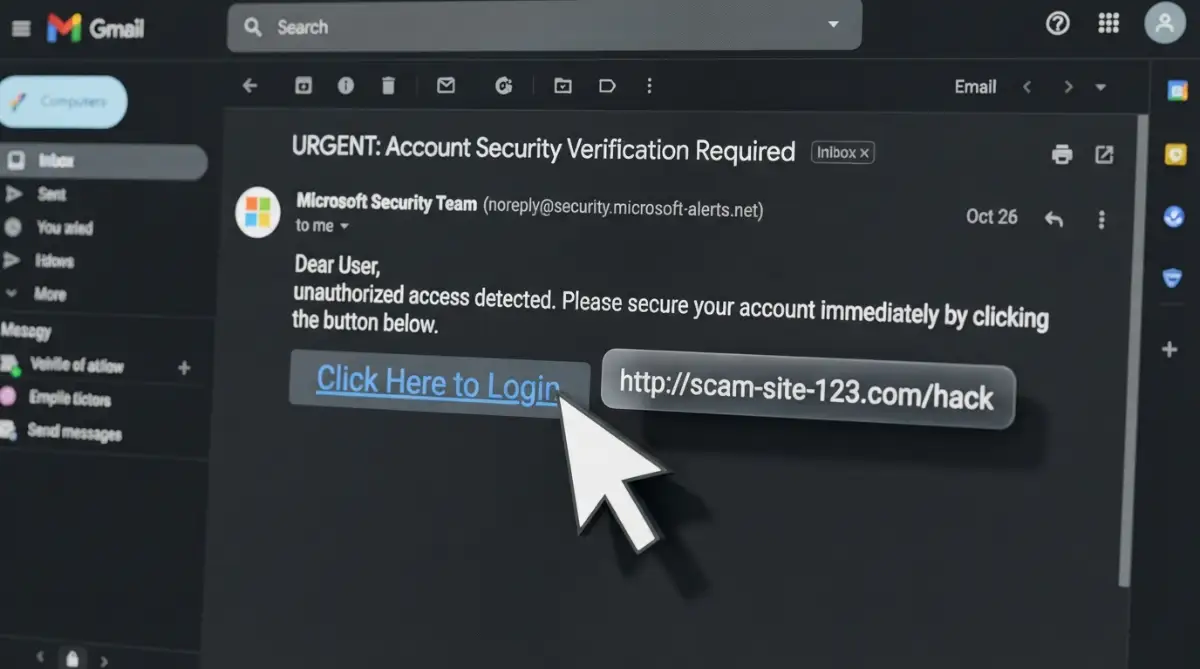
- The exact "hover trick" to spot dangerous links without clicking them.
- Why setting up an extra lock (two-step verification) makes you nearly hacker-proof.
- Simple habits to stop panic-clicking and protect your bank account.
Unmasking the Digital Thieves: A Practical Guide
Now we will break down exactly how you can spot these traps before they cause any harm to your digital life. We will look at real examples and clear techniques you can use right now.
Your 30-Second Security Checklist
Before you click any link in an email, ask yourself these 4 questions:
- Is the email address real? (Click the sender's name to see the full address, not just the name).
- Where does the link go? (Hover your mouse over it or long-press on mobile to see the real URL).
- Are they rushing me? (If the email sounds like an emergency, it is probably a trap).
- Did I expect this? (If you didn't ask for a password reset or a shipping update, don't trust it).
The Masked Stranger: Decoding the Sender's Address
Think of an email address exactly like a caller ID on your mobile phone. Just because the name on the screen says "Apple Support" does not mean Apple is actually calling you.
Scammers can easily change the display name on any message they send out. This is their absolute favorite trick to gain your trust immediately.
To see behind their digital mask, you must look at the actual email address, not just the display name. On your computer, simply hover your mouse over the sender's name. On a smartphone, tap the name to expand the contact details.
If the message is truly from your bank, the address should end in the bank's official website name. For example, a real message from PayPal will always end in exactly "@paypal.com".
Fake emails often use public services like "@gmail.com" or slightly misspelled domains. You might see something tricky like "@paypaI-support.com" with a capital "I" instead of an "l".
These tiny spelling changes are specifically designed to trick your brain. Our eyes naturally skim over familiar words, making it dangerously easy to miss a single wrong letter.
To help you stay sharp, here is a quick look at the most common 'Look-Alike' domains I have personally seen recently:
Quick Reality Check: Myth vs. Fact
- Myth: If an email has a massive, high-quality company logo, it is 100% safe.
- Fact: Literally anyone can right-click, save a logo from Google, and paste it into an email in three seconds. Never trust the picture; only trust the actual email address!
Expert Pro Tip: Never trust the display name alone. Always expand the sender details and read the actual email address letter by letter. If it looks even slightly strange, delete the message instantly.
I used to think I was too smart to get tricked, but I actually clicked a bad link last year just because the email had a perfect company logo. That scary mistake taught me to slow down, and now my unbreakable daily rule is to double-check the real email address before I even think about moving my mouse.
The Panic Button: How Scammers Manipulate Your Emotions
Cyber attackers know perfectly well that calm people make rational decisions. That is exactly why they want you to panic and rush.
When we feel scared or rushed, our logical thinking process completely shuts down. We react instinctively to protect ourselves or our valuable accounts.
This is why almost every fake message includes a tight deadline or a scary consequence. They will aggressively tell you that your account will be permanently deleted in 24 hours.
Sometimes they use highly positive emotions instead of fear to manipulate you. They might claim you won a massive online lottery or an expensive free vacation.
If an email ever makes your heart beat faster, take a deep breath. Step away from your computer screen for a full minute to calm down.
Legitimate companies will never force you to make an instant security decision through a random link. They will always give you clear instructions on how to log in safely.
The X-Ray Vision Technique: Inspecting Links Before Clicking
Links are the main weapons in any modern phishing attack. A link is basically a digital doorway, and you need to know exactly where it leads before opening it.
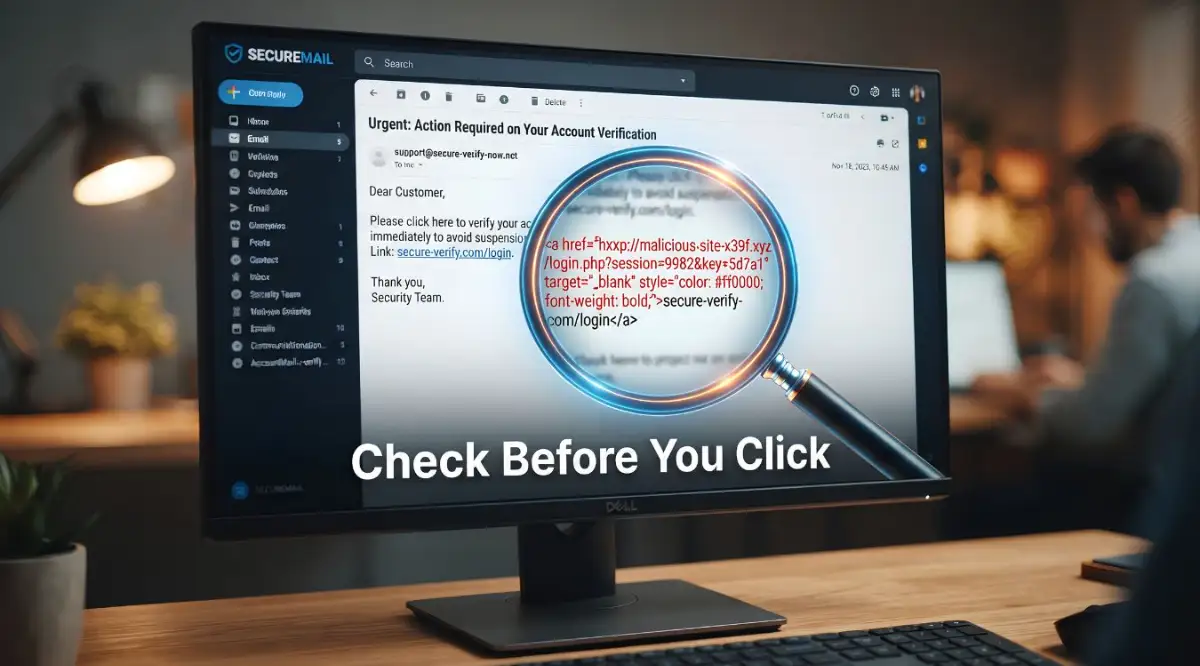
Fortunately, you have a built-in X-ray tool right on your computer mouse. It is commonly called "hovering".
When you place your mouse pointer over a link without clicking, a small grey box will appear at the bottom corner of your screen. This box shows you the true destination of that specific link.
This is where the scammers usually fail their disguise. The text in the email might proudly say "www.amazon.com/login", but the hidden box will show a completely different, strange website.
Imagine someone offering you a ride in a city taxi. The taxi sign looks real, but when you look closely at the license plate, it belongs to a stolen car. Hovering your mouse is exactly like checking that license plate.
If you are checking your inbox on a smartphone, the safety process is slightly different. Instead of hovering, you simply press and hold your finger firmly on the link.
A menu will naturally pop up showing you the exact web address. If the address looks messy, suspiciously long, or completely unrelated to the sender, do not tap it.
Want to see exactly how this hidden link trick works in real life? Watch the quick video below to see me expose a fake link on my own screen, and then keep reading to find out why downloading everyday attachments can secretly ruin your computer!
The Language Barrier: Why Scammers Make Grammar Mistakes
You might wonder why fake emails often contain strange spelling mistakes or weird phrasing. It is actually a very intentional strategy in many cases.
Some scammers are not native English speakers, which naturally leads to awkward sentences. They use automated translation tools that create highly unnatural sounding messages.
However, other sophisticated attackers use bad grammar completely on purpose. They want to filter out careful, observant people right away.
If a person ignores obvious spelling mistakes, they are much more likely to fall for the rest of the scam. This strange filtering process saves the attacker time.
Professional companies have entire teams dedicated to proofreading their official messages. A real message from Netflix or Microsoft will be polished, clear, and highly professional.
If you spot strange capitalization, missing commas, or words that just feel out of place, your alarms should go off. Always trust your gut feeling when a message reads poorly.
Unexpected Attachments: The Trojan Horses of Your Inbox
Sometimes digital attackers do not even bother with creating fake links. Instead, they directly attach a dangerous file to the message.
This file might be named something extremely boring like "Invoice Details" or "Payment Receipt". They rely entirely on your natural curiosity to open it.
Downloading a fake attachment is exactly like inviting a thief straight into your living room. These files often contain hidden software that secretly spies on your computer.
Once opened, this invisible software can quietly record your keystrokes, capturing your passwords as you type them. It happens completely in the background without you ever noticing anything strange.
Legitimate businesses rarely send unexpected attachments, especially ZIP files or random software programs. If you did not ask for a file, you should never open it.
Pro Tip from My Experience: If you receive an unexpected invoice as an attachment, don't download it to check the amount. Instead, look at the file extension. If it ends in .zip, .exe, .html, or .jar, delete it immediately. Real companies almost always send invoices as standard PDFs, and even then, it is safer to just log into your account through your browser to see your balance.
Even basic PDF documents can carry hidden threats nowadays. If a company claims you owe them money, log into your account directly through their official website to check your real billing status.
Spotting the Difference: A Quick Comparison
To make things easier, let us compare a real company message with a dangerous fake one side by side.
Real-Life Scenario: The Boss Scam
Let us look at a very specific trap that catches thousands of smart office workers off guard. It is commonly called the CEO fraud.
You receive a short, direct message from your company boss. The display name on the screen matches perfectly.
The message simply says, "Are you at your desk? I need a quick favor, it is highly confidential."
Because you want to be a helpful and responsive employee, you reply quickly. The scammer then asks you to buy digital gift cards for a surprise client presentation.
They promise the company will reimburse you immediately for the expense. This works incredibly well because people are naturally eager to please their managers.
The safest solution here is simple verification. If your boss ever asks for something unusual involving money or passwords, pick up your phone and call them directly.
A quick voice conversation instantly breaks the digital illusion. Scammers absolutely hate when you take the conversation outside of their controlled email environment.
Building a Bulletproof Personal Security Routine
Protecting yourself does not require expensive software or an advanced degree in computer science. It requires building a simple, unbreakable daily habit.
Every single time you open your inbox, put on your detective hat. Take five extra seconds to verify the true sender before reading the actual content.
Make it a strict personal rule to never use email links to access sensitive accounts. Whether it is your social media, banking, or email provider, always type the web address yourself.
This one simple habit alone will protect you from the vast majority of digital traps. Scammers rely heavily on lazy, automatic clicking from their victims.
When you slow down and take full control of your actions, you completely remove their power over you. You instantly become an impossible target for them.
The Ultimate Safety Net: Multi-Factor Authentication
Even if you accidentally click a bad link and type your password, all is not permanently lost. There is a powerful safety net you can easily set up right now.
It is called multi-factor authentication, or two-step verification. It acts exactly like a heavy deadbolt on your digital front door.
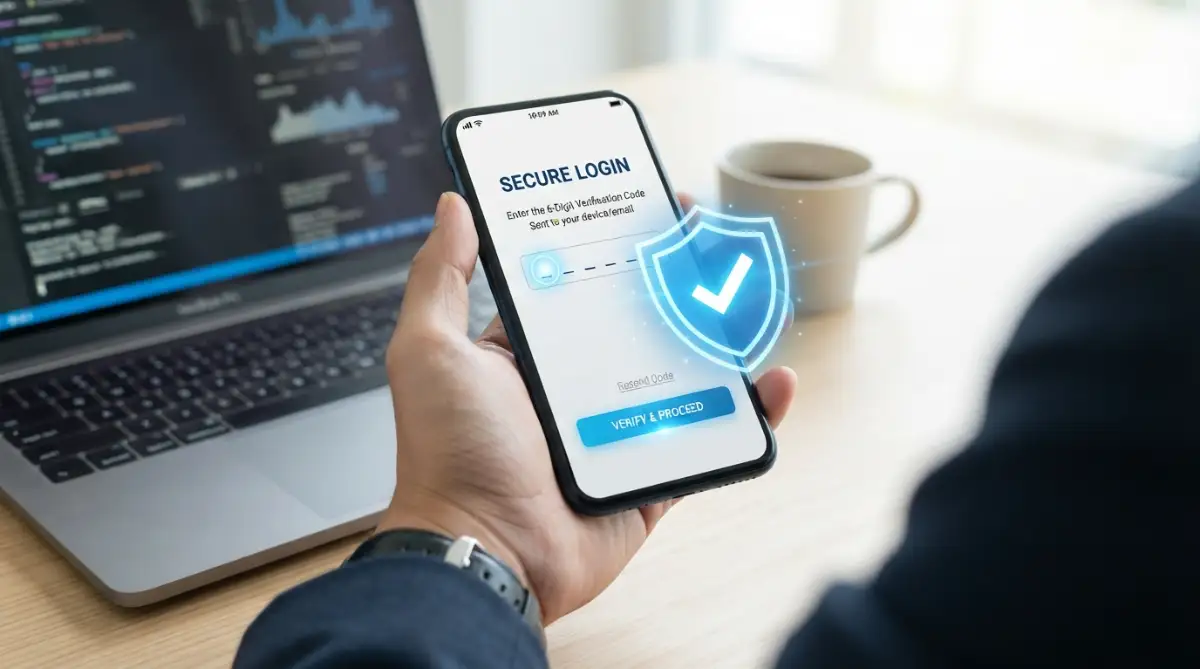
With this security feature turned on, knowing your password is only half the battle. The website will also naturally ask for a temporary code sent directly to your mobile phone.
Even if a scammer successfully steals your password through a fake website, they still cannot log in. They simply do not have your physical phone in their criminal hands.
Mini Q&A: What if I lose my phone?
- You might be wondering: "If I turn on multi-factor authentication and drop my phone in the pool, am I locked out forever?"
- My answer: Not at all! When you set up this security feature, platforms always give you a set of printable "backup codes." Just keep those codes in your desk drawer, and you can easily log back in from a new device.
Setting this up takes less than five minutes for most major online platforms. It is the single most effective barrier you can easily place between your personal data and the criminal world.
We highly recommend turning this feature on for your main email account first. If an attacker controls your primary email, they can quickly reset the passwords for everything else you own.
Secure your primary inbox properly, and you effectively secure your entire digital life from outside threats.
Going Beyond the Basics: Pro Tactics to Outsmart Hackers
Now that you know the foundational rules of email safety, it is time to level up your defenses. Cybercriminals are constantly updating their tricks to bypass basic security measures.
To stay truly safe, you need to think a few steps ahead of these digital thieves. Let us explore some advanced strategies that security experts use to keep their private data completely locked down.
The Hidden "Reply-To" Trap
Most people know to check the sender's email address, but attackers have found a clever way around this. They use a deceptive technique involving the "Reply-To" field in your email system.
When you hit the reply button, your email provider automatically fills in the destination address. A hacker can easily program a fake email to display a legitimate sender address, like support@yourbank.com.
However, they secretly change the hidden "Reply-To" address in the background coding. If you reply to that message, your sensitive response actually goes straight to the scammer's secret inbox.
Always double-check the address that pops up after you click reply. If the original email came from a trusted company, but the reply window shows a strange, random address, you are definitely looking at a scam.
Why the Green Padlock is Lying to You
For years, we were all taught to look for the small padlock icon next to a website address. We believed that if a website started with "HTTPS", it was completely safe to use.
Unfortunately, this safety rule is now dangerously outdated. Today, nearly half of all fake phishing websites use secure HTTPS connections to trick you.
The padlock simply means your connection to that specific website is encrypted and private. It does not mean the person running the website is honest or safe.
You could be sending your private passwords over a highly secure connection straight to a criminal in another country. Never trust a website just because your browser says the connection is secure.
You must still read the actual website address carefully. If you want to dive deeper into how criminals manipulate our trust, I highly recommend reading up on identifying modern social engineering tactics from national security databases.
The Unbeatable Password Manager Shield
One of the absolute best defenses against fake websites is something you might already be using for convenience. A high-quality password manager is practically immune to visual tricks.
When you visit a website, your password manager looks at the underlying computer code of the web address. It does not care how realistic the website looks to your human eyes.
If you land on a fake banking page that looks identical to the real one, your password manager will refuse to autofill your login details. It recognizes that the domain name is slightly different.
When your password manager suddenly stops working on a familiar website, treat it as a massive red flag. The software is quietly saving you from handing over your credentials to a thief.
The Danger of Mobile Multitasking
Smartphones have completely changed how we interact with our daily messages. We check our inboxes while waiting in line, walking the dog, or cooking dinner.
This constant distraction makes us the perfect targets for quick scams. When you are busy and only looking at a tiny screen, you are much more likely to miss obvious warning signs.
Mobile email apps naturally hide the sender's full email address to save valuable screen space. They only show the friendly display name, which we already know is easily faked.
If you receive a highly urgent message about your finances, do not deal with it on your phone. Wait until you can sit down at a proper computer monitor.
Scammers often target our moments of high stress. If you are already busy organizing multiple debt payments without feeling overwhelmed, a sudden email threatening to close your credit card account will easily trigger a panic response.
Looking at a suspicious message on a large screen gives your brain time to process the details. You will spot the spelling errors and strange links much easier when you are fully focused.
Recognizing Targeted "Spear Phishing"
Basic scams are sent to millions of random people at once, hoping just a few will click. But there is a much more dangerous version called spear phishing.
In a spear phishing attack, the criminal does extensive research on you specifically. They scroll through your public social media profiles to learn about your life, your job, and your friends.
They will craft a highly personalized message that mentions your recent vacation or your current job title. This completely disarms your natural suspicion because the email feels so incredibly accurate.
They might pretend to be a local vendor you actually work with, referencing a real ongoing project. These are the hardest traps to spot because the context makes perfect sense.
To defeat this, you must keep your public social media profiles as private as possible. The less information a hacker can easily find about your daily habits, the harder it is for them to manipulate you.
The Dangerous Traps We All Fall Into
Even smart, well-educated people lose their life savings to digital fraud every single day. Let us break down the most common mental mistakes people make when dealing with their inboxes.
Relying Entirely on Antivirus Software
A massive mistake people make is believing their expensive security software will catch everything. They assume that if an email makes it into their main inbox, it must be completely safe.
No security filter in the world is one hundred percent perfect. Criminals test their fake messages against popular antivirus programs before they ever send them to you.
They constantly tweak their wording and code until the filters let the message slip through. Your email provider's spam folder is a great tool, but it is never a guarantee of safety.
You are always the final and most important line of defense. If you blindly trust the software, you will eventually click on something dangerous.
The Illusion of Professional Logos
We are visually wired to trust familiar branding. When we see the colorful Google logo or the bright blue PayPal header, our brain instantly relaxes.
You need to understand that copying a company logo takes exactly three seconds. Any teenager with an internet connection can right-click, save an image, and paste it into a fake email.
Scammers will copy the exact fonts, color schemes, and legal footers from real company emails. They make their traps look so professional that it feels foolish to doubt them.
Do not let a pretty graphic cloud your judgment. A beautifully designed email can still carry a highly destructive computer virus.
Reacting to Artificial Time Pressure
I mentioned this earlier, but it is so important that it needs deeper explanation. Criminals use fake deadlines because human psychology makes us terrible decision-makers under extreme pressure.
Imagine getting an email saying your tax return was rejected, and you have two hours to update your details or face massive fines. Your heart rate spikes immediately.
When panic sets in, you stop looking for misspelled words or strange links. You just want to fix the terrifying problem as fast as humanly possible.
This emotional hijacking is the primary reason smart people get tricked. You must train yourself to recognize this sudden rush of anxiety as a warning sign itself.
If an email ever makes you feel scared, angry, or overly excited, take your hands off the keyboard. Go get a glass of water and let your logic return before you make a move.
The "It Will Never Happen to Me" Mindset
Perhaps the most dangerous mistake is pure arrogance. Many people believe they are simply too clever to fall for a digital scam.
They think phishing attacks only fool the elderly or those who are bad with technology. This false sense of security leads to lazy browsing habits and quick clicking.
Cybercriminals love overconfident victims. When you assume you are safe, you stop paying close attention to the small, hidden details.
Having your digital identity stolen is an emotionally devastating experience. It can completely drain your bank accounts and destroy your credit rating in just a few days.
Rebuilding your life after an attack is exhausting. This makes finding the true cost of your next loan incredibly difficult because lenders will see fraudulent marks on your financial history.
If you ever realize you have made a mistake and clicked a bad link, do not hide it out of embarrassment. Act immediately by contacting your bank and officially reporting digital fraud to the proper government authorities.
Your Personal Action Plan for a Safer Digital Life
We have covered a massive amount of ground today. You now possess the exact same knowledge that professional security analysts use to protect corporate networks.
The goal here is not to make you paranoid or terrified of your own computer. The goal is to build strong, natural habits that keep you protected without causing you extra stress.
Let us turn everything we discussed into a simple, positive action plan that you can start using right now.
Tomorrow Morning's Inbox Challenge
When you wake up tomorrow and open your email app, I want you to try a small experiment. Treat every single unread message as a complete stranger knocking on your front door.
Do not automatically open the door just because they claim to be the mailman. Look through the peephole first.
Expand the sender's details and read the actual address carefully. Look closely for those tiny, sneaky spelling mistakes that scammers rely on.
If a message asks you to log into an account, completely ignore the big shiny button they provided. Open a brand new web browser tab and type the company's address yourself.
This single habit takes only five extra seconds of your time. Those five seconds are the difference between keeping your money safe and spending months fighting identity theft.
A Quick Daily Checklist for Peace of Mind
To make things incredibly simple, keep these golden rules in your mind whenever you browse the internet:
Slow down your reactions. Never let an email rush you into making a fast decision about your money or personal passwords.
Verify outside the inbox. If your bank, your boss, or a family member sends an unusual request, call them on a real phone to ask if it is genuine.
Guard your personal details. Remember that legitimate companies will never ask for your full social security number or exact password through a random message.
Trust your instincts. If an offer seems too wonderful to be true, or a warning feels strangely aggressive, your gut is probably right. Just delete it.
Stepping Forward with Total Confidence
You do not need an advanced computer science degree to beat cybercriminals. You just need patience, awareness, and a healthy dose of skepticism.
By applying these practical steps, you are no longer an easy target. You have taken full control of your personal digital environment.
Start practicing these simple verification habits today. Share this knowledge with your parents, your friends, and your coworkers to help keep them safe too.
When you know exactly what the traps look like, the internet stops being a scary place. You can finally enjoy the convenience of your digital life with complete and total peace of mind.
Taking control of my digital safety brought me a massive amount of relief, and I promise it will do the exact same thing for you. Start using these easy habits today, and you will never let a hidden online thief bully you into panic clicking again!
Disclaimer: The information provided in this article is for educational and informational purposes only. It does not constitute professional cybersecurity advice, financial advice, or legal counsel. Always consult with certified IT professionals or your financial institution directly if you suspect your personal accounts have been compromised. We are not responsible for any digital losses or security breaches.